
It is Tuesday afternoon and you have six tabs open.
Somebody has to figure this out. The whiteboard schedule got erased again last week and a crew mobilized to a job that had been moved. The hours from the Henderson boundary still are not reconciled. There is a plat that needs to go out today and you are supposed to be evaluating software.
So you start reading. And every site says the same three things. Manage your projects. Track your team. Grow your business. One of them will not show you a price without a scheduled call. Another wants a demo before it will show you the product at all. A third has a pricing page, but the pricing page has three tiers and none of them explain what happens when you hire two more people in the spring.
Forty minutes in, you have learned almost nothing. Not because you are bad at this. Because none of these sites are answering the question you actually have, which is whether this thing will work in a survey office.
Here is a way to cut through it.
Why software evaluation usually goes wrong
Most people evaluate software by comparing feature lists. It feels rigorous. You build a spreadsheet, you put the products across the top and the features down the side, you fill in the checkmarks.
The problem is that at this level, every product has every feature. Scheduling, check. Time tracking, check. Invoicing, check. The chart fills up and tells you nothing, because a checkmark does not distinguish between a scheduling module built for a survey firm and one built for a marketing agency that you will spend two years bending into shape.
What determines whether a software purchase works is not the feature list. It is four things the feature list cannot show you.
Fit. Does the product understand how a survey firm is staffed and how the work actually moves.
Flexibility. Does it bend to how your office runs, or does it assume there is one right way.
Adoption. Will the people who have to use it every day actually use it, including the ones standing in a field holding a rod.
Total cost over time. Not the price today. The price when you are twelve people instead of seven, plus everything that is not in the sticker price.
The questions below get at those four things. They work on any vendor. Ask them all and the answers will separate the field faster than any comparison chart.
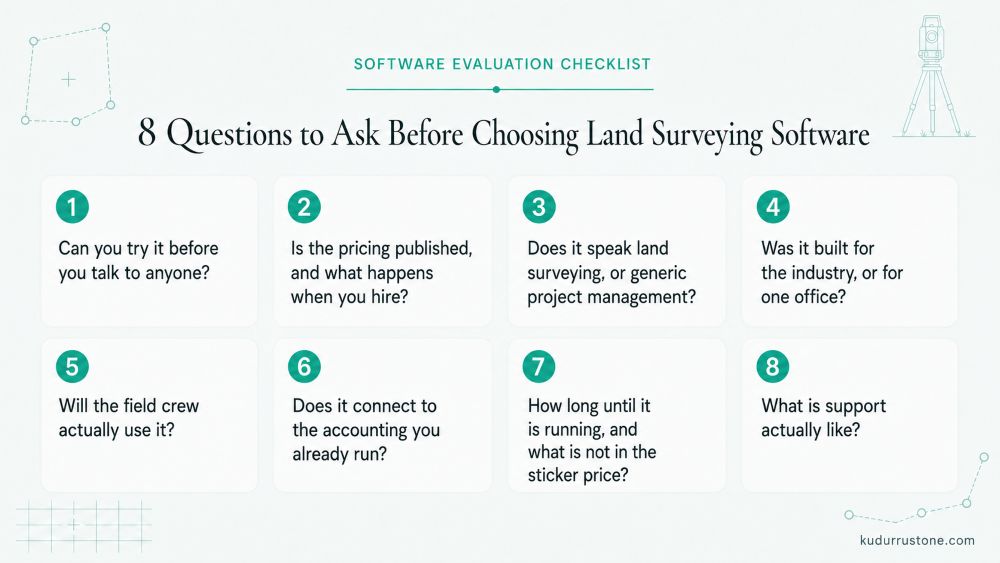
1. Can you try it before you talk to anyone?
Start here, because the answer tells you a lot.
A company that is confident in its product lets you into it. A company that requires a scheduled call before you can see anything is making a choice about who controls your evaluation, and it is not you.
A demo is not a bad thing. Some products are complicated enough that a walkthrough saves you an hour of confusion, and a good demo from someone who knows the industry is worth taking. The question is whether the demo is offered or required. Offered is fine. Required means you cannot form your own opinion until someone has formed it for you.
Good answer: here is a trial, go look, call us if you get stuck. Bad answer: let us get you on the calendar first.
Also ask what the trial contains. A trial that only runs on canned demo data is a slideshow with a cursor. You want the real product with your own jobs in it.
2. Is the pricing published, and what happens when you hire?
If a company will not put a price on its website, there is usually a reason, and the reason is usually that the price depends on what they think you can pay.
Published pricing is only half the question though. The more important half is the pricing model, and there are two models worth understanding before you talk to anyone.
Flat per-employee pricing. Every person on your payroll costs the same per month. Sounds simple. It means a rodman costs the same as a principal, every seasonal hire raises your bill at the full rate, and the firm that grows gets charged for growing.
Bracketed or grouped pricing. This one is easier to miss and it can cost more. The vendor prices in blocks. One to twenty users is one price, twenty-one to forty is the next. A ten-person firm pays exactly what a twenty-person firm pays. You are subsidizing a firm twice your size, and the worst per-user economics in the entire pricing table are sitting at the bottom of every bracket, which is usually where a small firm lands.
There is a simple way to test for this. Ask the vendor what your bill is at your current headcount. Then ask what it is with one more person. Then one fewer. If the number does not move smoothly in both directions, you are in a bracket, and you should find out where the edges are before you sign anything.
Then run it forward. What does this cost at the headcount you expect in three years? Ask it out loud, on the call or in an email. That single question has ended more software evaluations than any missing feature.
For what it is worth, our pricing is published on the site with the math worked out for a six-person and a ten-person firm, because we would rather you run your own numbers than sit through a call to get them.
3. Does it speak land surveying, or generic project management?
Open the product and read the words.
Does it know what a party chief is? Does it have a place for a field crew that is distinct from an office role? Does it understand that a job has a boundary, a plat, an as-built, corners, monuments? Or does it have "team members" and "tasks" and "clients," which is what every general project management tool has, because it was built for everybody and therefore for nobody in particular.
You can make a general tool work. Firms do it every day with spreadsheets, shared calendars, and a QuickBooks file held together with hope. But somebody at your firm pays for that translation work, forever. Every new hire learns not just the software but your firm's private dialect for using it.
Software built for land surveying Software built for land surveying arrives with the vocabulary already correct. That is not a marketing detail. It is a setup cost you never have to pay.
4. Was it built for the industry, or for one office?
This is the question almost nobody asks, and it is the one that predicts the most pain later.
A lot of software in this space started the same way. A firm owner asked a family member, an employee, or a hired developer to build something to run his office. It worked. It ran that office well. Then somebody said the obvious thing: if it works here, it should work anywhere, so let us sell it.
That is a reasonable instinct and it produces a specific kind of product. Every assumption that one office made about how work should flow is now hardcoded. The way that firm assigned crews. The order that firm did things in. The approval step that firm's bookkeeper insisted on in 2014. None of it is configurable, because it was never a decision, it was just how things were done there.
Then it gets sold to your firm, which does things differently, and now you are running somebody else's office habits.
"Built by surveyors, for surveyors" matters. You want a product from people who know what a backsight is. But ask the follow-up: built for how many surveyors? One firm, or the industry? A product built from many firms' workflows has seen the ways offices differ and has been designed to accommodate them. A product built from one firm's workflow has one office's habits baked in and cannot tell you why any of them are there.
Here is how to test it without taking anyone's word for anything:
- Ask what is configurable and what is fixed. A vendor who has built for the industry can answer specifically and quickly.
- Ask what happens if you assign work differently than they expect. Watch whether the answer is "here is how you would set that up" or "most firms do it this way."
- Ask whether two firms the same size would use the product the same way. If the honest answer is yes, that is a warning.
- Ask why a particular step exists. If nobody can explain it, it is somebody else's habit.
No product bends infinitely, and one that claims to is usually a blank spreadsheet with a login. What you are looking for is real room to move inside a structure that was designed to have room in it.

5. Will the field crew actually use it?
This is where most of these purchases quietly die.
The office buys software. The office likes the software. The crews are told to use it. Two weeks later the crews are writing hours on the back of a field book page again, because the app took nine taps, needed a signal they did not have at the bottom of a draw, and logged them out every time the phone locked.
Ask specifically what a crew member does on a normal day. Walk through it. On a phone, with gloves on, at 6:40 in the morning in the yard, and again at 4:30 when they are tired and want to go home.
Then ask what happens with no signal. Then ask what happens when someone forgets and has to fix Monday's hours on Thursday.
If the answers get complicated, believe the complication. Crews route around friction every time. It is not a discipline problem, it is a physics problem, and no amount of insisting changes it.
Two places this matters most are survey crew scheduling software, because a schedule the crew cannot see is not a schedule, and time tracking for survey crews, because hours written down Friday from memory are not hours, they are estimates.
6. Does it connect to the accounting you already run?
If work has to be entered twice, once in the new software and once in your books, the software has created a job instead of removing one.
Ask exactly what moves between the two systems and in which direction. Ask whether it is a real connection or a CSV export somebody has to remember to run. Ask who fixes it when a sync fails, and how you find out that it failed.
Most survey firms are running QuickBooks. If you are one of them, the QuickBooks integration for land surveyors question deserves more of your evaluation time than half the feature list, because this is the seam where hours become money, and it is the seam where money goes missing.
7. How long until it is running, and what is not in the sticker price?
Two questions that are really one question: what does getting started actually cost, in weeks and in dollars.
On weeks, do not ask how long signup takes. Signup takes four minutes everywhere. Ask how long until real jobs are in it, the crews are on it, and the office is working out of it instead of the spreadsheet. Ask what you have to do during that time and who does it. If the honest answer involves a week of somebody's life keying in your client list, that is a real cost and it belongs in your comparison.
On dollars, ask plainly what carries a separate charge. The list to run through:
- Onboarding or implementation fees
- Training sessions
- Data migration from your current system
- Additional demos or walkthroughs after you have signed up
- Support beyond a basic tier
- Minimum contract length or early termination terms
Some vendors charge for several of these and the numbers are not small. An implementation fee can equal several months of subscription before you have used the product for anything. Get the total number, not the monthly one, and get it in writing.
We do not charge for any of that. Onboarding, setup help, and follow-up demos are included, because charging a firm extra to learn the thing they just bought has never made sense to us.
8. What is support actually like?
Everyone says support is important and almost nobody tests it during evaluation. Do it.
Send a real question during your trial. Not "hi, testing." An actual question about something you could not figure out. Then time the response and read it carefully.
What you are looking for:
Who answers. A person or a ticket queue. Someone who knows what a traverse is, or someone reading from a script who will escalate.
How fast. Ask for their actual commitment, then check it against what happened when you emailed.
What happens when something breaks on a Thursday afternoon with payroll due Friday and hours you cannot get to.
Whether feedback goes anywhere. This is the one nobody asks and it matters most over five years. Ask when they last shipped something a customer asked for, and what it was. A vendor who can name it immediately has a real relationship with the firms using the product. A vendor who cannot is running a roadmap you have no influence over, and you will be living with that for as long as you use it.
While you are at it, ask how you would get your data out if you ever left, in what format and how long it would take. You are not planning to leave. You ask because a company that has thought carefully about the relationship answers in about four seconds, and vagueness there tells you something.
Run the numbers at the size you are going to be
The math is simple and people still get it wrong, because they run it at today's headcount.
A lot of surveying software charges $40 or more per employee per month. Take a ten-person firm. That is $400 a month before a single option, and it climbs every time you hire, at the same rate whether the hire is a licensed surveyor or a summer rodman.
Now run it at fourteen people, which is where you might be in three years if things go the way you want. That is $560 a month and you have added nothing to the product. You are paying more for growing.
Add whatever the onboarding and training fees came to. Then compare all of it against what the disorganization is costing you right now. One crew mobilizing to the wrong site, with drive time and a burned half day, runs a few hundred dollars by itself. A handful of unbilled field hours a month is more than most of these tools cost in a year.
That comparison, honestly run, is usually the whole decision. Not the feature chart.
How to run a trial so it tells you something
Most people open a trial, click around for ten minutes, decide it looks fine or looks confusing, and close the tab. That is not an evaluation, that is a vibe.
Here is a better method and it takes about an hour.
Pick one real job you finished in the last month. Not a hypothetical, a real one, ideally one that went a little sideways. Put it through the software end to end. Enter the quote. Schedule the crew. Record the hours the way the crew would have recorded them. Take it through to an invoice.
One job, all the way through.
You will learn more in that hour than in a week of reading comparison pages. You will find the step where it gets awkward. You will find out whether the terminology matched your world or whether you had to translate. You will find out whether the product bent to how you work or asked you to bend. And you will find out whether you could hand this to your office manager on Monday.
If it survives one real job it will probably survive a hundred. If it cannot, you just saved yourself a purchase.
Red flags
Any one of these is worth a hard question.
- No pricing until you take a call.
- No trial of any kind, only demos.
- Pricing that jumps in brackets instead of moving per user.
- Onboarding, training, or migration fees that only surface late in the conversation.
- A product that shows you dashboards and charts but never the daily work.
- "Most firms do it this way" as the answer to how you would do it your way.
- Vague or defensive answers about setup time.
- Terminology borrowed from general contracting rather than land surveying.
- Nobody can name a single thing a customer asked for that got built.
What to do with this
You now have a checklist. Eight questions, one hour of real testing, and a cost calculation run at the size you are going to be rather than the size you are.
Use it on everybody, including us. That is the point of it. We publish our pricing, we include onboarding and setup, we aim to answer support email inside an hour, and we let you into the product without a call. All of that is because we would rather you test us than take our word for anything.
Start a 7-day free trial. No credit card, no sales call. Put one real job through it and see what you think.
If you would rather be walked through it first, book a demo and we will show you the parts that matter for how your firm actually works.
Seven days, no credit card.
See whether it fits your firm.
Set up your first project in the time it takes to read this article.
Start Free Trial - No Credit Card